
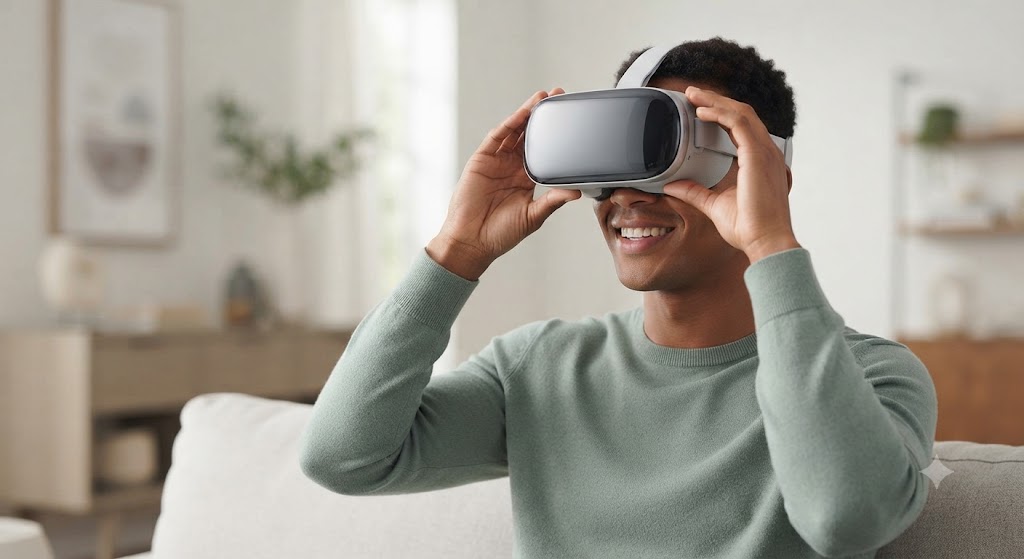
Buying your first VR headset should not feel like studying for a test. It does for most people, because most headset guides are written for people who already know the terms. This one is not.
Here is the short answer. If you own a decent gaming PC and want the sharpest picture, get a PC-tethered headset. If you want something that works right out of the box with no PC, no cables, and no fuss, get a standalone headset. Most first-time buyers should start standalone. That single choice settles about 80% of the decision.
The rest of this guide walks through the parts that actually matter, in plain words, so you can make a choice you will not regret. This is our full vr headset buying guide for 2026, and we update it as prices and models change.
What Is a VR Headset, in Plain Words?
A VR headset is a pair of goggles you wear on your face. It shows a slightly different picture to each eye. Your brain blends the two pictures into one 3D image. When you turn your head, the picture moves with you, so it feels like you are standing inside the scene instead of looking at a screen.
Most headsets today also come with two hand controllers. You hold one in each hand. They let you point, grab, and press buttons inside the virtual world, almost like using your real hands.
That is really it. If you want the deeper mechanics behind how the tracking and display actually work, we cover that separately in our beginner’s overview of how virtual reality works. For now, everything else in this guide is about which version of that idea fits your life and your wallet.
The One Question That Decides Everything: Standalone or PC-Tethered?
Every VR headset falls into one of two main groups.
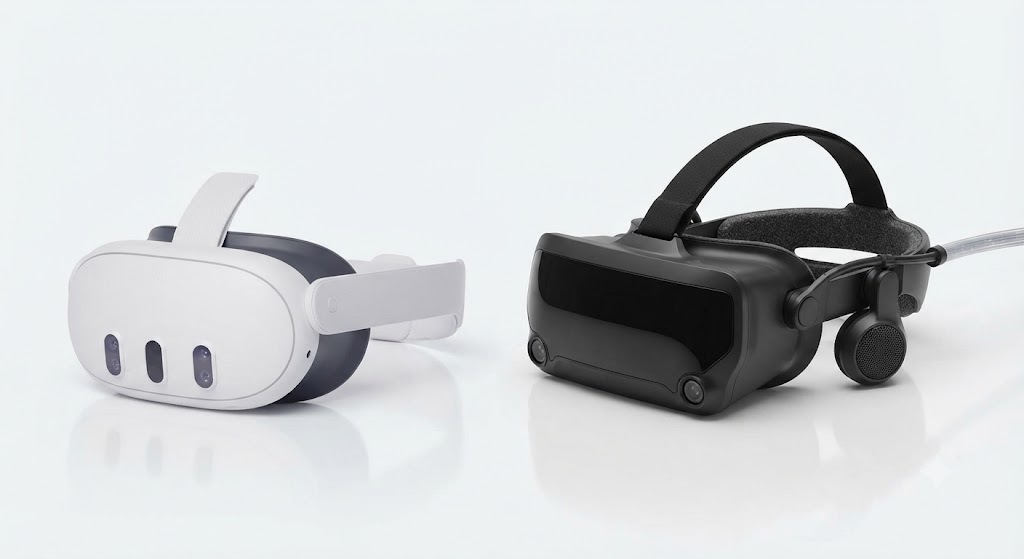
Standalone headsets have a small computer built right into the goggles. You charge them, put them on, and go. Nothing else to buy or plug in. The Meta Quest 3 is the best-known example, and it is also the most popular headset in the world right now.
PC-tethered headsets are lighter on the head because the heavy processing happens on a separate gaming PC, connected by a cable. You get sharper graphics and smoother motion, but only if your computer is strong enough to run it. The Valve Index is a well-known example.
There is also a middle option. Some standalone headsets, including the Quest 3, can plug into a PC when you want the extra power, then go fully wireless again when you do not. That flexibility is one reason standalone headsets have taken over most of the market.
Here is a simple way to decide.
- Choose standalone if you do not own a gaming PC, want the simplest setup, or plan to use VR mostly for fitness, casual games, or watching videos.
- Choose PC-tethered if you already have a strong gaming PC, care most about visual sharpness, and play VR games that demand top performance, like fast action or racing titles.
Here is the same comparison laid out side by side, so you can see the tradeoff at a glance.
| Standalone | PC-Tethered | |
| Setup | Charge and wear, no PC needed | Requires a gaming PC and cable |
| Convenience | High, fully wireless | Lower, tied to your PC |
| Visual quality | Good to very good | Best available |
| Typical price | $250 to $650 | $400 to $1,000+, plus PC cost |
| Best for | First-timers, fitness, casual and social VR | Enthusiasts with a strong PC, competitive or graphics-heavy games |
| Example | Meta Quest 3 | Valve Index |
We go much deeper on this exact decision, including a full breakdown of price and performance, in our guide on VR headset types and features. For a look at what is shipping right now across both categories, our roundup of the latest VR systems worth buying in 2026 tracks new releases as they land.
What Actually Matters When You Buy a VR Headset
Once you know standalone or PC-tethered, six things separate a good headset from one you will regret.
Resolution
This is how sharp the picture looks. Higher numbers mean less of that screen-door effect, where you can see tiny gaps between pixels. Most 2026 headsets have solved this well enough that you will not notice it during normal use.
Refresh rate
This is how many times per second the picture updates, measured in Hz. Below 72Hz, fast movement can look choppy and even make some people feel queasy. At 90Hz or higher, movement feels smooth and natural.
Field of view
This is how much of your side vision the headset fills. A narrow field of view feels like looking through a diving mask. A wide one feels like the virtual world wraps around you.
Comfort and weight
You will notice this after twenty minutes, not in the first thirty seconds. Look for adjustable straps, balanced weight, and enough padding that glasses wearers are not stuck.
Battery life
Standalone headsets typically last two to three hours per charge. If you plan on long sessions, check whether the headset supports charging while you play, or whether you will need to buy a battery pack separately.
Tracking quality
This is how accurately the headset knows where your head and hands are. Nearly every modern headset uses inside-out tracking, meaning built-in cameras handle it with no extra sensors to set up around your room.
None of these specs matter in isolation. A headset with amazing resolution but poor comfort will end up in a drawer. Weigh all six together against how you actually plan to use it.
How Much Do VR Headsets Actually Cost in 2026?
People search “how much are VR headsets” more than almost any other question on this topic, and for good reason. Prices vary a lot depending on the type.
According to IDC’s Worldwide Quarterly Augmented and Virtual Reality Headset Tracker, the average selling price for a VR headset sits around $376 in 2026, though that figure blends budget and premium devices together. IDC also forecasts roughly 13.6 million headsets will ship worldwide this year, generating about $5.1 billion in revenue, so this is a genuinely large and fast-moving market, not a niche hobby.
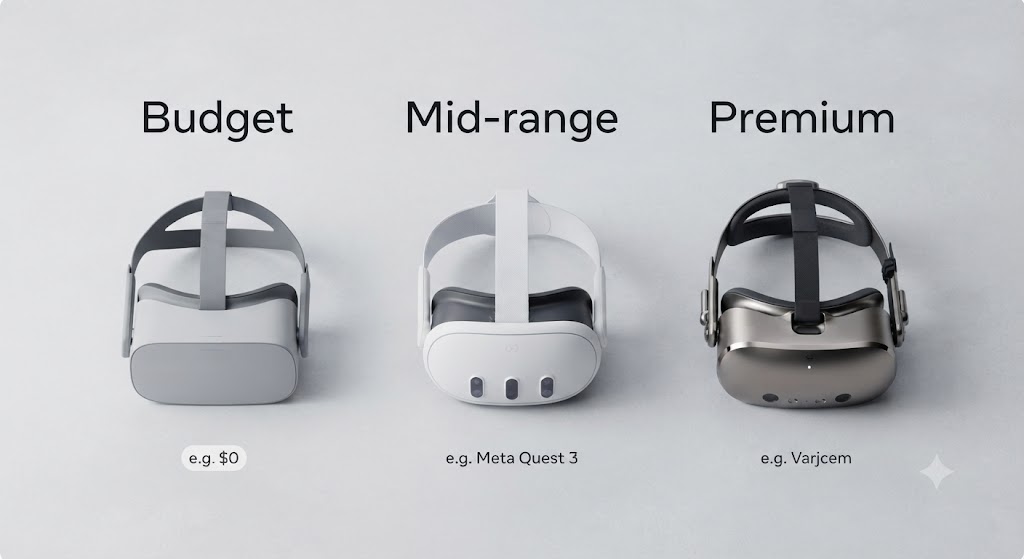
In practice, prices break into three simple tiers.
| Tier | Price range | What you get | Best for |
| Budget | Under $300 | Lower resolution, shorter battery, basic tracking | Trying VR for the first time, casual games, fitness apps |
| Mid-range | $300 to $600 | Strong resolution, solid comfort, long software support | Most buyers, including nearly every first-time purchase |
| Premium | $700 and up | Top resolution, specialized tracking, mixed-reality features | Enthusiasts, professionals, design or medical training |
If this is your first headset, the mid-range tier is almost always the right call. It avoids the frustrations of budget hardware without paying for premium features you will not use yet. The jump from budget to mid-range is usually very noticeable. The jump from mid-range to premium is smaller than the price difference suggests, which is why we do not recommend premium headsets for a first purchase.
Do You Need a Powerful Computer?
Not necessarily, and this trips up more first-time buyers than any other question.
If you go standalone, the answer is simple: no. The headset has everything it needs built in.
If you go PC-tethered, your computer needs a decent graphics card, enough RAM, and the right connection ports. Every PC-tethered headset publishes minimum and recommended specs on its official page, and it is worth checking those before you buy rather than after. A headset that technically “works” on a weak PC often runs at a low frame rate, which is the fastest way to feel motion sick in VR.
A good rule of thumb: if your PC can comfortably run recent AAA games at high settings, it can almost certainly run VR well too.
What Comes in the Box, and What You Might Buy Separately?
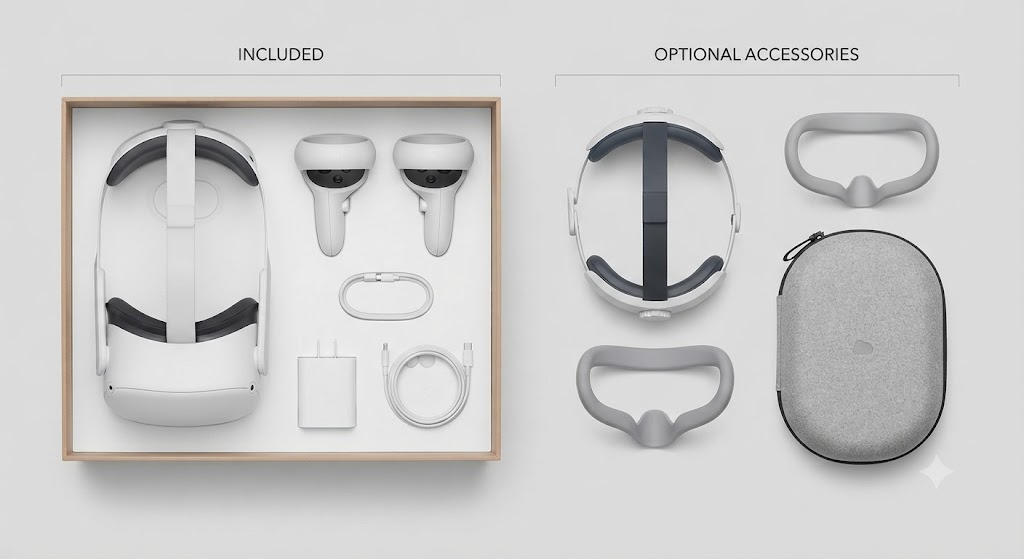
Most headsets ship with the goggles, two controllers, a charging cable, and a basic set of foam face padding. That is enough to get started the same day it arrives.
A few accessories make a real difference for many owners, even though they are optional at first:
- A comfort strap or halo strap, which spreads the weight more evenly than the stock strap
- A silicone or fabric face cover, especially useful if more than one person in the house uses the headset
- Lens protectors, which are cheap insurance against scratches
- An external battery pack, for anyone who plays longer than two hours at a time
None of these are required to enjoy your headset. Buy the headset first, use it for a few weeks, then add accessories only for the specific problem you actually run into, like a sore forehead or a headset that dies mid-session.
Controllers deserve a special mention, since they wear out or go missing more often than the headset itself. If you already own an older headset and just need to sort out a controller issue, our guide to Oculus Quest 2 controllers covers pairing, common problems, and replacement options in detail.
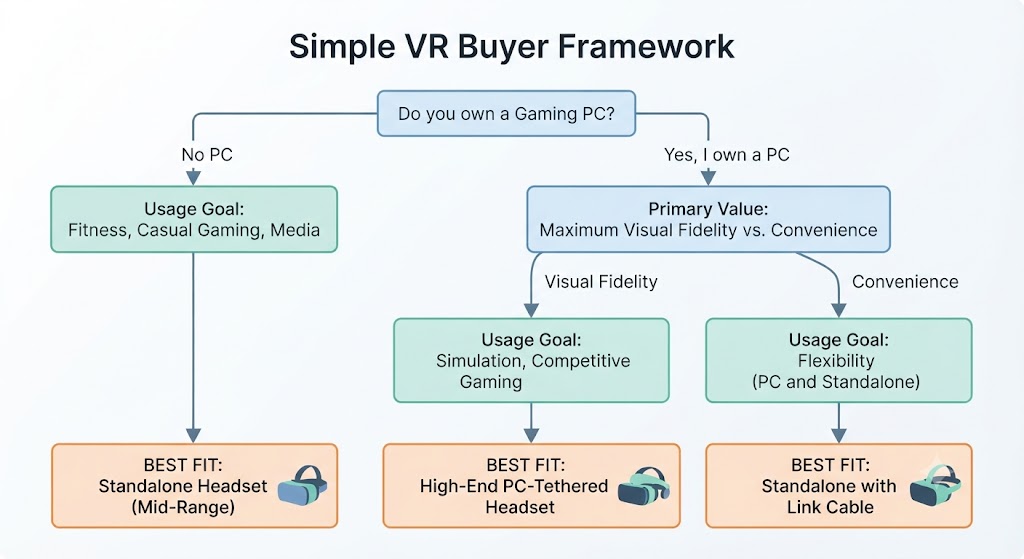
The Simple VR Buyer Framework
Most buying guides list a dozen headsets and leave you to figure out the rest. Instead, answer three questions and you will land on the right type of headset almost every time.
Question 1: Do you already own a gaming PC? If no, a standalone headset is your answer. Skip to Question 3. If yes, continue to Question 2.
Question 2: Do you care more about visual sharpness than convenience? If sharpness matters most, look at PC-tethered headsets. If convenience matters most, a standalone is still the better fit, even with a gaming PC sitting right there.
Question 3: What will you use it for most? Fitness or casual games: budget or mid-range standalone. Story-driven games or social VR: mid-range standalone. Competitive or fast-action gaming: PC-tethered, or a standalone headset with a PC-link cable. Work, design, or professional use: check whether your specific software requires a particular headset before buying anything.
Three questions, and you have narrowed the entire market down to one type and one price tier. From there, comparing two or three specific models is a much smaller decision than comparing all of them at once.
Real-World Evidence: The Framework Backed by Actual Cases
Rather than invent buyer stories, here are three real, documented cases that map onto the framework above, each with a source you can check yourself.
Case 1: A real fitness buyer, and the science behind why it worked.
Psychologist Erick Gallun has publicly credited the VR fitness app Supernatural, used on a standalone Meta Quest headset, with building the physical fitness that helped him survive major heart surgery, as reported by MIXED News. His experience lines up with the science: a peer-reviewed University of Victoria study published in JMIR Serious Games measured Supernatural’s energy expenditure directly and found its Flow mode produces cardio benefits comparable to running, while its Boxing mode compares to real boxing or cycling at moderate intensity. Running the framework, no PC needed, main use is fitness, so a standalone headset with a strong fitness app library is exactly the right call, which is what both Gallun and the study population used.
Case 2: A real, published PC-tethered upgrade verdict
RoadToVR, one of the most established outlets covering VR hardware, published an in-depth Valve Index review with a specific, testable conclusion: if you already own a first-generation headset and use it heavily, the Index is a worthwhile upgrade for the extra fidelity and tracking precision. But if ease of use, not specs, was the reason you stopped using an earlier headset, RoadToVR’s own reviewers concluded that the Index will not fix that. This is the PC-tethered path from the framework in practice, chosen specifically for sharpness and precision, not convenience, and it comes from a reviewer who tested the tradeoff directly rather than a marketing page.
Case 3: Enterprise-scale proof that the headset itself delivers measurable results
Walmart’s VR training program, run with Strivr and covered by Chief Learning Officer, is one of the largest documented VR headset deployments in the world, training more than a million employees. The results are specific and public: trainees reported a 30% higher satisfaction rating than traditional training, and scored higher on content tests 70% of the time. This is not a personal buying decision, but it is real evidence, at a scale few case studies reach, that headset choice and content quality directly change outcomes, which is the entire premise behind spending time on the framework above instead of grabbing the first headset you see.
Common Mistakes First-Time Buyers Make
Buying based on resolution alone
Comfort and refresh rate affect your actual experience more than an extra few hundred pixels most people cannot consciously notice.
Skipping the PC spec check
Buying a PC-tethered headset before confirming your computer can run it leads to returns and refunds more than any other mistake on this list.
Ignoring play space
Room-scale VR needs a genuinely clear area. Measure your space before you buy, not after you unbox.
Assuming every game works on every headset
Content libraries differ by platform. If there is a specific game or app you want, confirm it supports the headset you are considering first.
Overspending on the first purchase
A mid-range headset is enough to find out whether VR is for you. Save the premium tier for your second purchase, once you know exactly what you want more of.
Final Thoughts
Choosing a VR headset comes down to two decisions, not twelve. First, standalone or PC-tethered, based on whether you own a gaming PC and how much you value convenience over raw sharpness. Second, which price tier best reflects how serious you are about VR right now, with mid-range as the right starting point for almost everyone.
Everything else- brand, specific model, and accessories- is easier to figure out once those two decisions are locked in. If you want the specific model-by-model breakdown, our full headset comparison picks up exactly where this guide leaves off.
Frequently Asked Questions
Can I use a VR headset without a PC or console?
Yes. Standalone headsets like the Meta Quest 3 work entirely on their own, with no PC, no console, and no cables required.
Do VR headsets work if I wear glasses?
Most modern headsets accommodate glasses, either directly or with an included spacer. Check the specific headset’s fit guide if you wear thicker frames.
How long does a VR headset battery actually last?
Typically two to three hours of active use on standalone headsets. PC-tethered headsets have no battery limit since they draw power through the cable.
Is VR bad for children?
Most headset manufacturers set a minimum recommended age, often around 10 to 13, due to how the vestibular system develops. Always check the specific headset’s guidelines before letting a child use it unsupervised.
Will a VR headset make me feel sick?
Some people experience motion sickness, especially early on or in fast-moving games. It tends to fade with short, regular sessions rather than long ones right away.
- Coherent Market Insights, VR Headsets Market Trends 2026-2033 — https://www.coherentmarketinsights.com/market-insight/virtual-reality-headsets-market-1346
- SQ Magazine, Virtual Reality Statistics 2026 – https://sqmagazine.co.uk/virtual-reality-statistics/
- Fortune Business Insights, Virtual Reality Market Report — https://www.fortunebusinessinsights.com/industry-reports/virtual-reality-market-101378
- Our own guide: VR Headset Technology Explained — for readers who want the deeper technical breakdown of how the tech works.