
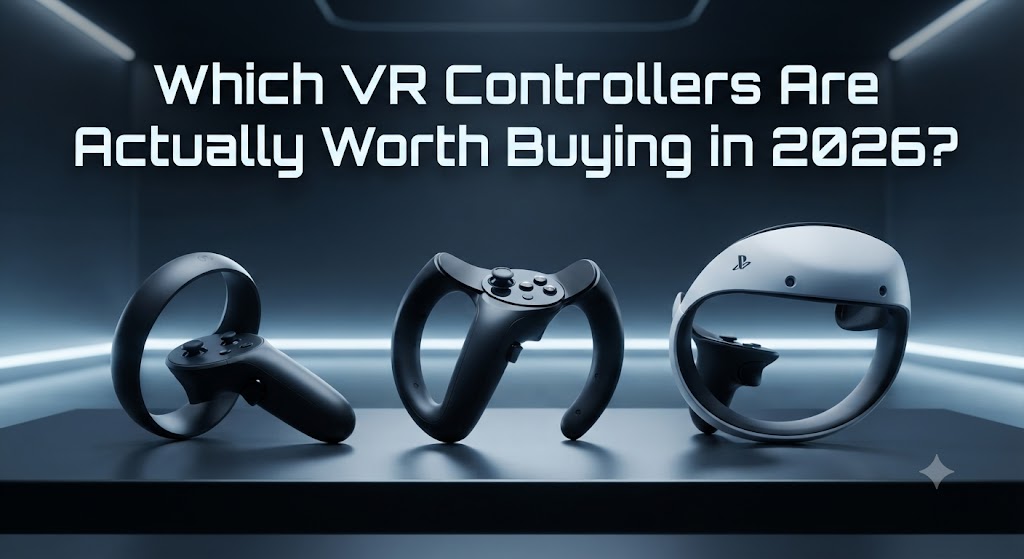
If you only remember one thing from this guide, remember this: the controllers that came in the box with your headset are already the best VR controllers for most people. You only need to look elsewhere if you own a PC-tethered headset and want finger-level tracking, or if you are replacing a lost or broken controller.
That covers about 90% of readers. The other 10%, PC VR enthusiasts, competitive players, and anyone dealing with a controller that will not pair, is exactly who the rest of this guide is for. This is our full best vr controllers 2026 comparison, and we keep it updated as new hardware ships.
What Do VR Controllers Actually Do?
A VR controller tracks the position of your hand in 3D space and reads your button, trigger, and thumbstick input, then sends both to the headset dozens of times per second. That is what lets you reach out, grab a virtual object, swing a sword, or point a menu selector with a motion that feels close to using your real hand.
Nearly every modern controller does this without any external sensors in the room. The headset’s own cameras, or the controller’s own tracking ring, handle it. That was not always true. Older systems needed base stations mounted on your walls. If you are shopping in 2026, you can safely ignore anything that requires that setup, since it is a solved problem now, as we cover in more depth in our beginner’s overview of how virtual reality works.
How VR Controller Tracking Actually Works
There are really only two tracking methods in use today, and knowing the difference helps explain why controllers behave the way they do.
Inside-out tracking
It is used by Meta Touch Plus and PSVR2 Sense and relies on cameras built into the headset itself watching the controller’s position as you move it. It is simple to set up, since there is nothing to mount on your walls, but tracking can briefly get less accurate if a controller moves fully behind your back or below the headset’s camera view.
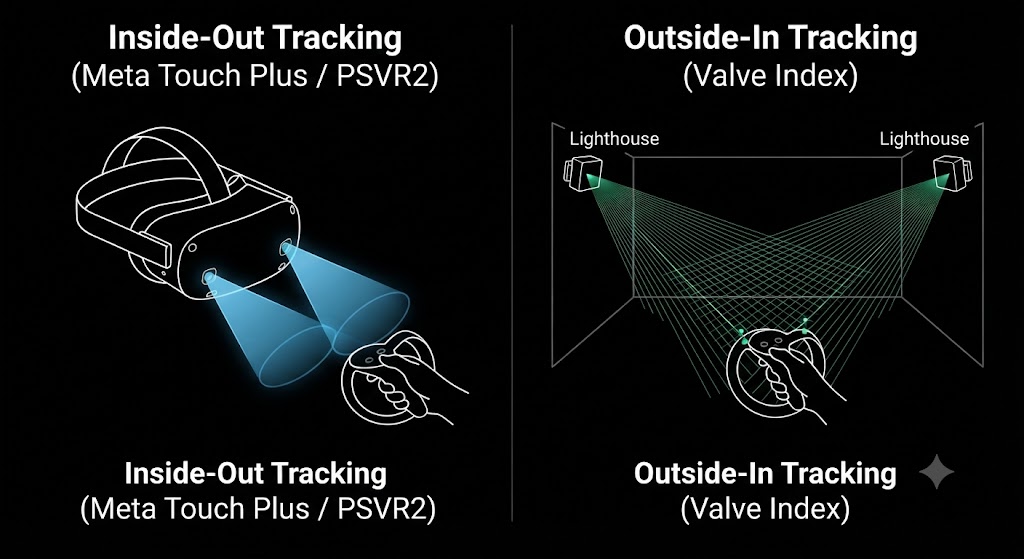
Outside-in tracking
This is used by the Valve Index and its Knuckles controllers; it works the opposite way. Fixed base stations, called Lighthouses in Valve’s system, sweep laser signals across the room, and sensors on the controller pick up the timing to calculate exact position. It requires mounting hardware in your play space, but it tends to hold up better during fast, wide movements since the tracking source is not attached to the thing being tracked.
Neither method is strictly better. Inside-out is why standalone headsets can work anywhere with zero setup, and outside-in is part of why PC VR enthusiasts still consider Lighthouse tracking the gold standard for precision in fast-paced games.
A Brief History of How VR Controllers Got Here
Motion controllers did not start with VR headsets. The concept dates back to the Nintendo Wii Remote in 2006, which demonstrated that consumers would accept swinging a physical object rather than pressing buttons. Sony’s PlayStation Move, released in 2010, adapted that idea for its early PlayStation VR headset, using a glowing orb tracked by an external camera.
The real shift came with the Oculus Touch controllers in 2016, which introduced the ergonomic, ring-tracked design that most modern controllers, including the ones compared in this guide, still build on. Everything since has been refinement: better haptics, finger-level sensing, and the recent move toward removing the tracking ring entirely, rather than a fundamentally new approach. Understanding that lineage is useful context if you are also researching the latest VR systems worth buying in 2026, since controller design has generally moved slower than headset design over the same period.
The Best VR Controllers in 2026, Compared
Here is how the three controllers most readers will actually encounter stack up.
| Features | Meta Quest Touch Plus | Valve Index Knuckles | PSVR2 Sense |
| Works with | Meta Quest 3, Quest 3S | SteamVR PC headsets | PlayStation VR2 |
| Tracking | Ring-free, headset camera tracking | SteamVR Lighthouse base stations | Headset-based inside-out tracking |
| Standout feature | TruTouch haptics, two-stage trigger | Individual finger tracking via capacitive sensors | Adaptive triggers and finger touch detection, shared tech with the DualSense |
| Power | Disposable AA battery, optional charging dock | Internal rechargeable battery, USB-C | Built-in rechargeable battery |
| Price | Included with headset, around $299 to replace a pair | Included with Index, roughly $279 to buy separately | Included with PSVR2 |
| Best for | Most Quest owners, no extra purchase needed | PC VR enthusiasts who want finger-level detail | PS5 owners who already have a DualSense-style feel in mind |
We go deeper on how each headset platform pairs with its own controllers in our VR headset types and features guide, and if you are still deciding on a headset first, our VR headset buying guide walks through that decision before you get to controllers at all.
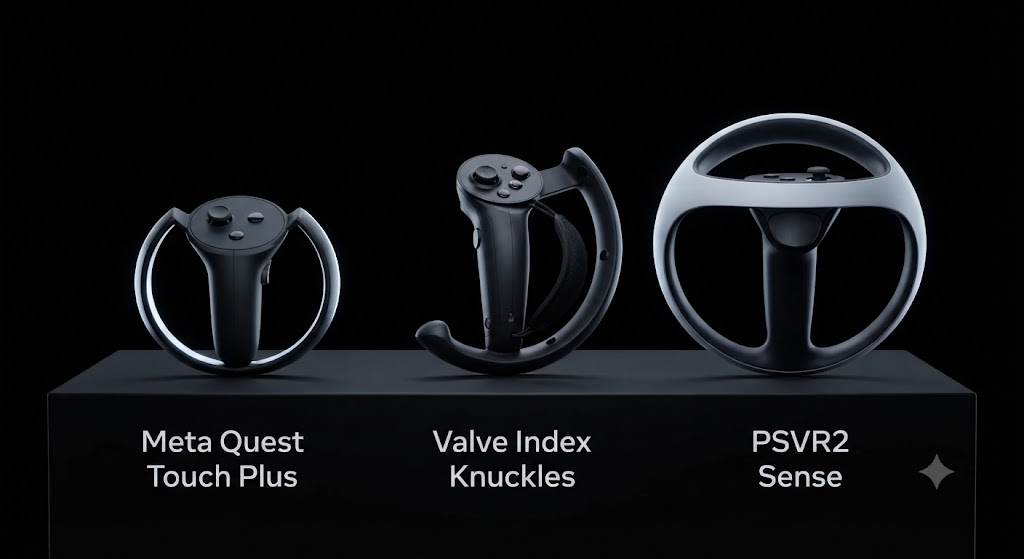
Meta Quest Touch Plus: Best for Most People
If you own a Meta Quest 3 or Quest 3S, you already have these. The Touch Plus controllers dropped the tracking ring earlier models relied on, moving the tracking sensors into the controller body itself, which makes them noticeably more compact in the hand.
They use TruTouch haptic feedback, giving you a range of vibration sensations from a light patter to a stronger recoil, and a two-stage trigger that can register a partial squeeze separately from a full pull. One tradeoff worth knowing before you buy a replacement pair: according to Meta’s own support documentation, Touch Plus controllers run on a single disposable AA battery each, not an internal rechargeable cell, though Meta sells an optional charging dock separately if you would rather not keep a drawer of spare batteries.
For nearly everyone reading this, there is no reason to look past what came in the box.
Valve Index Knuckles: Best Finger Tracking on PC
The Index Knuckles controllers work differently from almost anything else on the market. Instead of gripping a handle, you slide your hand through a strap, which means you can fully open your palm, throw an object, or make an open-hand gesture without dropping the controller.
According to Valve’s own product page, the strap constantly recalibrates to match your hand size and skin capacitance, and the controllers are built specifically for longer play sessions where a traditional closed-fist grip gets uncomfortable. In a hands-on review, PCWorld confirmed the finger tracking genuinely works, calling the sensor array “laden with sensors” capable of reproducing individual finger motion, but noted the real value depends heavily on whether the specific game you are playing was built to use it. Plenty of SteamVR titles simply show your extra fingers moving without doing anything functional with that data.
The honest takeaway: buy Index Knuckles controllers because you want the most natural hand feel PC VR currently offers, not because you expect every game to meaningfully use finger tracking. Most will not.
PSVR2 Sense: Best for PlayStation Owners
If your VR setup runs through a PS5, the Sense controllers already do more than most people expect from a console accessory. Sony built them around the same adaptive trigger and haptic feedback technology found in the DualSense controller, so pulling back a bowstring in a game like Horizon Call of the Mountain produces real resistance in your hand, not just a vibration.
They also include finger touch detection, meaning the controller can sense roughly where your thumb, index, and middle fingers are resting without you pressing anything, according to Sony’s own PlayStation Blog announcement. It is a lighter-weight version of what the Index Knuckles do, built into a controller that ships in the box rather than sold as a premium accessory.
There is no reason to buy anything else if you are already invested in the PlayStation ecosystem. These controllers are not sold separately from the headset bundle in most markets.
Comfort, Hand Size, and Left-vs-Right-Handed Use
Specs matter less than fit once you have used a controller for more than twenty minutes. All three controllers in this guide come in a matched left and right pair designed for symmetrical use, so there is no dedicated left-handed or right-handed version to shop for, the same controller works in either hand.
Hand size is the bigger factor. Valve’s own materials note that the Index Knuckles strap adjusts at three points to accommodate different hand sizes, but reviewers have consistently pointed out that the controllers are optimized for average-to-large hands, and players with smaller hands sometimes find the buttons less comfortable. Meta’s Touch Plus and Sony’s Sense controllers use a more traditional grip shape that tends to fit a wider range of hand sizes without adjustment, since there is no strap system to calibrate.
If you or someone in your household has notably smaller hands, particularly for a shared family headset, try the controller in person before committing to a PC VR setup built around Knuckles specifically.
Which Games and Use Cases Actually Need the Best Controllers
Not every VR activity benefits equally from premium controller hardware, which matters if you are trying to decide whether an upgrade is worth it.
Rhythm and precision games, like Beat Saber, reward accurate, low-latency tracking above almost anything else. This is where the gap between a well-tracked controller and a cheaper alternative shows up fastest, since timing errors of even a few milliseconds are noticeable.
Story-driven and social VR apps put less demand on tracking precision and more on comfort during long sessions, since you are holding the controller for extended periods without fast motion. Battery life and grip comfort matter more here than finger-tracking fidelity.
Simulation and cockpit games, like flight or racing sims, often use controllers less directly, since many players pair a VR headset with a physical yoke, wheel, or throttle instead. If that is your use case, controller choice matters far less than headset compatibility with your existing peripherals.
Fitness apps benefit more from secure wrist straps and sweat-resistant grips than from any tracking spec, since a dropped controller mid-workout is the most common complaint in this category.
When Should You Skip Controllers Entirely?
For a meaningful group of users, the best controller is no controller at all. Hand tracking, where the headset’s cameras read your bare hands instead of a physical device, has moved from a novelty into a genuinely useful accessibility feature.
A peer-reviewed study published in the Journal of Patient Experience examined controller-free hand tracking as an adjunct to occupational therapy for patients recovering from upper-limb injuries. The researchers noted that traditional VR hand controllers can be genuinely difficult for people with limited grip strength or fine motor impairments to use, and that hand tracking removed that barrier entirely, letting patients interact with virtual objects using natural hand movements instead.

You do not need a clinical reason to use hand tracking. It is worth trying if you find controllers physically uncomfortable, if you are handing the headset to a young child, or if you just want quick menu navigation without picking anything up. Every major standalone headset supports it today as a built-in, no-purchase-required option.
How Much Do VR Controllers Actually Cost?
Standard controllers come bundled with your headset at no extra cost. The number people usually want is the replacement or standalone price, and it varies more than you might expect by platform.
- Meta Touch Plus: around $299 for a replacement pair, or less for a single controller
- Valve Index Knuckles: roughly $279 for a pair when bought separately from the headset
- PSVR2 Sense: not typically sold standalone, replacement usually means going through Sony support
If your budget is the main concern, pairing your buying decision with our budget-focused headset guide makes more sense than shopping for cheap third-party controllers, since compatibility issues with unofficial controllers are far more common than with unofficial headset accessories.
Replacing or Buying Extra Controllers
A second pair of controllers is worth it in a few specific situations: a shared household headset where two people play together, a controller that stopped tracking properly, or one that was lost. If you own a Quest 3 specifically and are shopping for a spare, stick to official Touch Plus controllers rather than third-party alternatives. Tracking accuracy on unofficial controllers is noticeably less consistent, based on the pattern of complaints in Meta’s own community support threads.
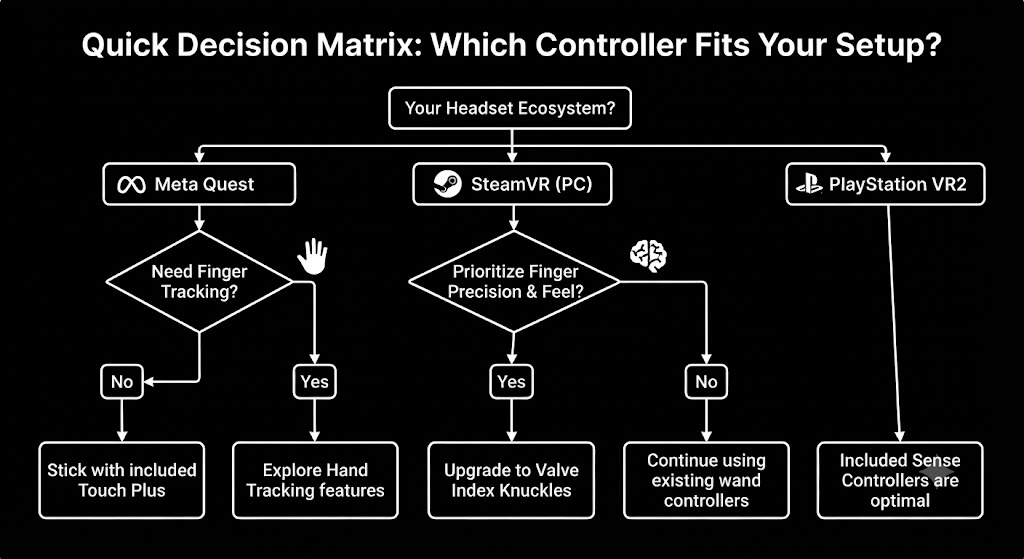
The VR Controller Buying Checklist
If you are buying controllers separately from a headset, whether as a replacement or an upgrade, run through these questions in order.
- Does it match your headset’s ecosystem? Controllers are not generally cross-compatible between Meta, Valve, and Sony platforms. Confirm official compatibility before anything else.
- Do you need finger-level tracking, or just reliable button input? Only PC VR enthusiasts using finger-tracking-supported games get real value from Knuckles-style controllers. Everyone else is better served by standard controllers.
- Is this a shared household device? If more than one person will use it regularly, prioritize comfort across different hand sizes over specialized features.
- Rechargeable or replaceable battery? AA-powered controllers mean no downtime while charging, but ongoing battery costs. Rechargeable controllers cost nothing per session but require planning around charge time.
- Buying official or third-party? Stick to official hardware unless you have specifically confirmed a third-party controller’s compatibility and reviews for your exact headset model.
Common Controller Problems and Quick Fixes
Most controller issues fall into one of three categories, and none of them require a replacement.
Controllers not tracking properly
This is almost always a lighting or line-of-sight issue. Make sure the play area has even lighting, no direct sunlight hitting the sensors, and that the controller is not spending extended time below waist height where the headset cameras cannot see it.
Controllers not pairing
Restart both the headset and the controller, and confirm the controller has fresh batteries or a full charge before trying again. A partially charged battery is the single most common cause of failed pairing.
Controllers disconnecting mid-session
This usually points to low battery or Bluetooth interference from other nearby devices. Move away from routers, other Bluetooth accessories, and microwaves, which can all interfere with the connection.
What’s Next for VR Controllers
The clearest signal of where hand input is heading is not a new controller at all. Meta’s Neural Band, a wrist-worn device using surface electromyography (EMG) to read electrical muscle signals rather than physical buttons, launched in 2025 alongside Meta’s Ray-Ban Display glasses. According to Meta’s own research blog, the technology was originally built to let people click, scroll, and select without any handheld device, and by early 2026 Meta was already demonstrating it controlling devices beyond its glasses lineup, including a research partnership with the University of Utah exploring its use for people with ALS and muscular dystrophy who cannot reliably grip a physical controller.
This is currently built for Meta’s AR glasses, not its VR headsets, so it will not replace your Touch Plus controllers next week. But the direction is worth watching if you are buying VR hardware with an eye on the next few years: the industry’s biggest player is actively investing in controller-free input as a serious accessibility and convenience feature, not just a novelty, and the same underlying research is likely to reach VR headsets eventually.
Final Thoughts
For the vast majority of readers, the best VR controller decision is simple: use what came in the box. Meta Touch Plus, Valve Index Knuckles, and PSVR2 Sense are each purpose-built for their own headset ecosystem, and shopping outside that ecosystem rarely improves the experience.
The two situations worth a second look are PC VR enthusiasts chasing the most natural finger-level interaction, where Index Knuckles genuinely deliver something different, and anyone who finds handheld controllers physically uncomfortable, where hand tracking is a free, built-in alternative worth trying before buying anything at all.
Frequently Asked Questions
Can I use third-party controllers with my VR headset?
Some are compatible, but tracking accuracy and haptic feedback quality are noticeably worse than official controllers in most user reports. Stick to official hardware unless you have confirmed compatibility for your specific headset model.
Do VR controllers work without a headset?
No. VR controllers are tracked by the headset’s cameras or a paired base station, so they have no function without the headset actively tracking them.
How long do VR controller batteries last?
This depends entirely on the controller type. Rechargeable controllers like the Index Knuckles typically last several hours per charge, while AA-powered controllers like the Touch Plus can last weeks of normal use per battery.
Is finger tracking on controllers the same as hand tracking?
No. Finger tracking on a controller like the Index Knuckles reads your fingers while you are still holding the device. Hand tracking uses the headset’s cameras to read your bare hands with no controller at all.
Can I buy just one controller instead of a pair?
Yes, for most platforms. Meta sells individual left or right Touch Plus controllers separately, which is useful if only one was lost or damaged.
Are VR controllers safe for kids to use?
Most manufacturers set a minimum recommended age for the headset itself, often 10 to 13, which effectively covers controller use too. Wrist straps should always be worn to prevent a thrown controller, and supervision is recommended for younger users regardless of the platform.
How do I clean VR controllers?
A soft, slightly damp cloth is sufficient for the grips and buttons. Avoid submerging any controller in water, and never spray cleaner directly onto the device, since moisture can damage the internal sensors.
Are VR controllers covered by warranty?
Yes, official controllers carry the same warranty terms as the headset they shipped with, typically one year from the manufacturer. Third-party controllers follow whatever warranty the third-party seller offers, which varies widely.
Author About
Aamir Khan is a senior technology writer with expertise in virtual reality, emerging technologies, digital transformation, and user experience. As a content specialist, he has developed and managed impactful content strategies for global audiences, which combine technical accuracy with practical insights. His work focuses on helping readers understand the real-world applications, innovations, and future impact of immersive technologies.