

Virtual reality sounds complex. And honestly, it is. But at the same time, the idea behind it is surprisingly simple.
You put on a headset, and suddenly, you are not in your room anymore. You are somewhere else. A game. A hospital simulation. A property tour. It feels real enough that your brain starts believing it.
That is where most people stop thinking.
But if you go one layer deeper, the real question is this: how does virtual reality actually pull this off?
It is not just graphics. It is not just a headset. It is a system working extremely fast in the background, constantly adjusting to your every move.
Let’s break it down properly.
What Is Virtual Reality (In Plain Terms)?
At its core, virtual reality replaces your real environment with a digital one.
You are not just watching something. You are inside it.
The system shows you a 3D world and then keeps updating that world based on how you move. According to Coursera’s explanation of VR systems, the entire experience depends on syncing your movement with visual feedback in real time. If that sync is accurate, your brain accepts it.
If it is not, the illusion breaks instantly.
Real Secret: VR Is About Your Brain, Not Just Technology
Most blogs focus on hardware. But the real story is your brain.
Virtual reality works because it taps into how your brain already understands the world.
Think about this:
- Your eyes see depth because each eye sees a slightly different angle
- Your brain tracks motion constantly
- Your body expects instant feedback when you move
VR simply replicates all of that.
It feeds your brain just enough information to say, “This looks real enough, I’ll accept it.”
That is the trick.
The 3 Layers That Make VR Work
Instead of overcomplicating it, break VR into three layers.
1. Hardware: The Physical Side
This is the part you can see and touch.
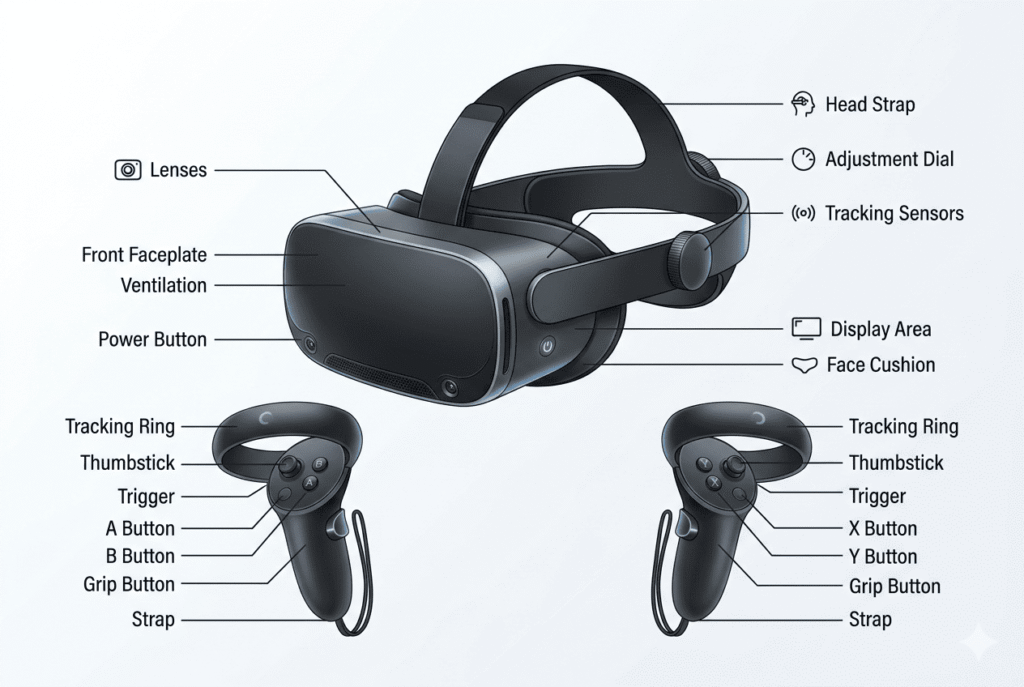
The Headset
The headset is where everything starts.
It shows you a 3D environment using two displays, one for each eye. This creates depth. That is why things feel like they are actually in front of you instead of flat.
Modern headsets also come packed with sensors like gyroscopes and accelerometers. If you want a deeper technical overview, the Wikipedia page on virtual reality headsets explains how these devices combine display systems with motion tracking.
Controllers
Controllers are what make VR interactive.
Without them, you are just looking around. With them, you are grabbing, moving, shooting, building.
They track your hands and send that data into the system instantly.
Sensors
This is where things get interesting.
Sensors are constantly watching what you are doing. Every small movement is captured.
A detailed breakdown of VR sensors shows how motion sensors, cameras, and infrared systems work together to track your position in real time. This is what keeps the experience aligned with your body.
2. Software: The System Running Everything
Hardware alone does nothing.
The software builds the world you are seeing. It processes movement data and updates everything accordingly.
This is called rendering.
Every time you move your head, the system recalculates what you should see. And it does this extremely fast, often over 90 times per second.
You never notice it. But that speed is everything.
3. Your Brain: The Final Piece
This is the part most people underestimate.
The system does not need to be perfect. It just needs to be believable.
Your brain fills in the gaps. It interprets motion, depth, and perspective automatically.
If everything lines up, even slightly, you feel presence.
That feeling of “I am actually here” is what VR is really selling.
How Virtual Reality Works Step by Step?
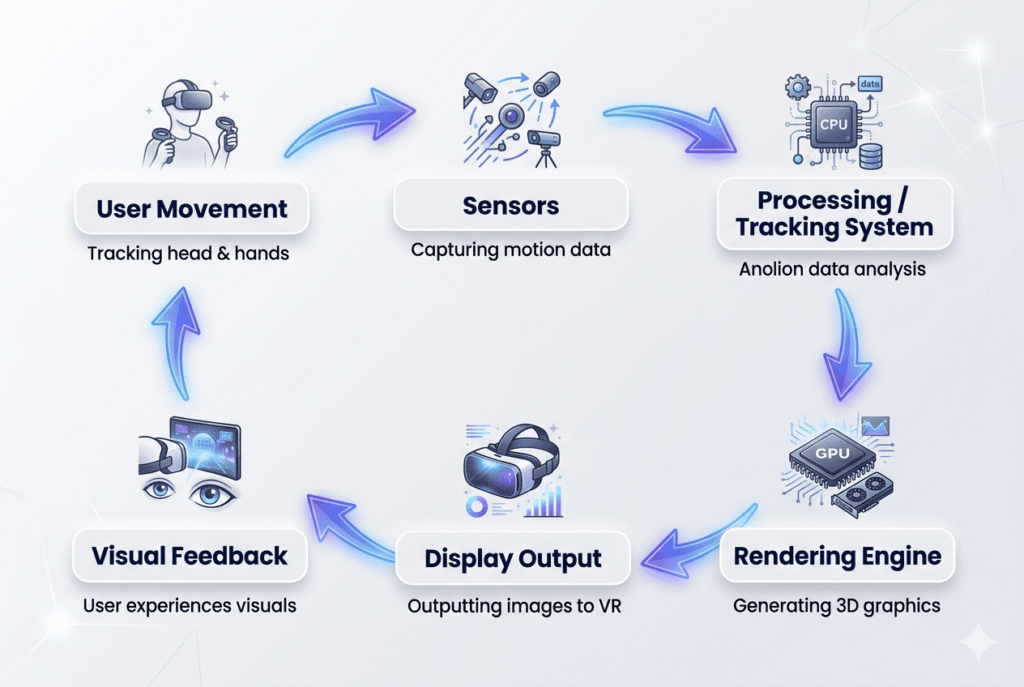
Now let’s connect everything into a simple flow.
Step 1: You Put on the Headset
The headset displays a 3D environment. Each eye sees a slightly different version of the same scene.
This creates depth instantly.
Step 2: The System Starts Tracking You
As soon as you move your head, sensors detect it.
Turn left, look up, lean forward. Everything is tracked.
Step 3: Tracking Systems Process Movement
The system now needs to understand where you are in space.
There are two main approaches here.
Inside-out tracking uses sensors on the headset itself. No external setup needed.
Outside-in tracking uses external cameras to track you more precisely. According to the HTC Vive developer blog, this method can offer higher accuracy but requires more setup.
Step 4: World Updates Instantly
Now the software kicks in.
It updates the environment based on your movement. If you move forward, the world moves accordingly. If you look up, the perspective shifts.
This happens in milliseconds.
Step 5: Your Brain Accepts It
This is the final step.
Your brain sees consistent motion, depth, and feedback. So it accepts the virtual world as real.
And just like that, you are inside the experience.
For a more detailed breakdown of how this all comes together as a full system, check out our guide: How Does Virtual Reality Work? An Overview — it covers VR components, rendering pipelines, and real-world applications in depth.
Why Tracking Is Everything in VR
If tracking is off, even a little, everything else stops mattering.
You could have the best graphics, an expensive headset, all of that. But the moment your movement doesn’t match what you’re seeing, your brain immediately pushes back. It just feels wrong.
That’s why tracking sits at the center of VR. Not visuals. Not design. Tracking.
The system has to constantly keep up with you. Every small head tilt, every shift in your body, even subtle hand movement. And it has to do it fast enough that you don’t notice the delay.
Because the second you notice it, the experience breaks.
Motion Tracking
This is the basic layer. It tracks where you’re looking.
Turn your head left, the world moves left. Look up, the view adjusts. Simple idea, but it has to be extremely precise.
It’s handled by sensors like gyroscopes and accelerometers, working together in the background.
You don’t see any of that happening. But if it’s even slightly inaccurate, things start to feel off in a way that’s hard to explain, but easy to feel.
Positional Tracking
Now this is where VR starts to feel more real.
Instead of just tracking where you’re looking, it tracks where you actually are in space.
So, if you lean forward, the world reacts. If you take a step, the environment shifts with you. If you crouch, your perspective drops.
This is the difference between “looking at a virtual world” and actually feeling like you’re inside it.
3DoF vs 6DoF
This is usually where people first notice the gap between basic and proper VR.
3DoF is limited. You can look around, but that’s it. No movement, no physical interaction. It feels more like a 360 video.
6DoF changes everything.
Now you can move, reach, lean, and walk. Your body becomes part of the experience. That’s when VR starts to feel less like a demo and more like something you’re actually inside.
Role of Sensors (Where Things Actually Happen)
Sensors don’t get much attention, but this is where most of the real work is happening.
They’re constantly reading what you’re doing. Not occasionally. Not when you press something. All the time.
And it’s not just one sensor doing everything. It’s multiple sensors feeding data into the system together.
Accelerometer
This one tracks movement. Not position, but changes in motion.
If you suddenly move your head or hand, the accelerometer picks that up instantly. It helps the system understand speed and direction.
Gyroscope
This handles orientation.
It keeps track of how your head is tilted or rotated. Without it, the system wouldn’t know where you’re looking properly.
Cameras
Cameras are doing more work than most people realize.
They’re scanning the environment, tracking your position, and sometimes even mapping the room around you.
In newer headsets, this is how inside-out tracking works. No external setup, but still accurate enough for most use cases.
Infrared Sensors
These are more behind-the-scenes.
They help with depth and tracking in conditions where normal cameras might struggle, like low light.
You won’t notice them directly, but they help keep everything stable.
The important part is this: none of these works alone.
The system combines all this data into one consistent understanding of where you are and how you’re moving.
That’s why, when VR works well, it feels smooth without you having to think about it.
Why VR Feels So Real
It’s not just graphics. A lot of people assume that.
You can have average visuals, but if these three things are right, it still feels convincing.
Immediate Response
You move, it responds. Instantly.
There’s no pause, no visible delay. It just keeps up with you.
That responsiveness is what makes your brain stay engaged in the experience instead of questioning it.
Depth Perception
Each eye gets a slightly different image. That’s what creates the 3D effect.
It’s the same way your real vision works. VR just replicates it.
That’s why objects feel like they have distance, not just shape.
Consistency
This is probably the most important one.
Everything behaves the way your brain expects it to.
You lean forward, and things get closer. You turn around; the world follows. Nothing feels out of place.
The moment that consistency breaks, even slightly, the illusion starts falling apart.
Real-World Example
Say you’re standing in a virtual room.
You turn your head to the right.
The system detects that movement immediately. It processes it, updates the scene, and shows you the new angle.
All of this happens so fast that you don’t consciously notice anything.
But your brain does.
It sees that everything matches your movement perfectly. No delay, no mismatch.
So it just goes along with it.
That’s really what VR is doing. It’s not forcing you to believe anything. It’s just giving your brain no reason to reject it.
Where VR Is Heading Next
Right now, VR is good. But it’s not complete yet.
You can still feel the limits sometimes. Tracking gaps, weight of the headset, and limited interaction.
But that’s changing.
We’re already seeing standalone headsets that don’t need wires. Eye tracking is starting to improve how things are rendered. Full-body tracking is slowly becoming more usable. To see exactly how this is unfolding, read our deep dive: How AI and VR Together Are Creating Smarter Immersive Experiences.
Beyond technology, VR is also opening up real-world applications that were unimaginable a decade ago. One of the most impactful is in medicine. Learn how it’s being used in VR in Healthcare: Changing the Dynamics of Therapeutics — from pain management to surgical training.
And for students and educators, the classroom is being redefined entirely. Explore how in our article on Virtual Reality in Education: A New Era of Learning.
The direction VR is heading is pretty clear. It’s moving toward a point where the experience no longer feels like technology. It just feels normal. And once it reaches that point, VR won’t feel like a separate world.
It will just feel like another version of reality.
Conclusion
Virtual reality is not just about visuals. It is a system built on speed, accuracy, and human perception.
Sensors capture movement. Tracking systems process it. Software renders the world. Your brain makes it feel real.
When all of these work together, something interesting happens.
You stop thinking about the technology.
And you just experience it.
FAQs
How does virtual reality actually work?
Virtual reality works by showing a 3D digital environment and updating it in real time based on your movements. Sensors track your motion, and the system adjusts the visuals instantly, making it feel real.
What are the main components of a VR system?
A VR system includes a headset, controllers, sensors, and software. The headset displays the environment, sensors track movement, and software processes everything.
Why does VR feel so realistic?
VR feels real because it instantly matches your physical movements with visual feedback. This alignment tricks your brain into accepting the virtual environment.
What is the difference between 3DoF and 6DoF in VR
3DoF tracks only head rotation, while 6DoF tracks full movement in space, including walking and bending. 6DoF provides a more immersive experience.
Do you need expensive equipment for VR to work
Not necessarily. Entry-level VR systems are available, but higher-end setups offer better tracking, visuals, and overall immersion.